LangGraph is a powerful extension of the
LangChain library, specially designed to orchestrate complex and dynamic workflows involving LLM agents. Among its most innovative features is the integration of external tools such as search engines, which allows a conversational agent to enrich itself and adapt to the specific needs of users.
In this article, we will guide you step-by-step in creating a LangGraph agent capable of using a search tool like Tavily to perform real-time web queries, enabling it to answer questions well beyond its pre-trained internal capabilities.
Why add tools to your LangGraph agent?
Agents based on large language models (LLMs) are powerful but inherently limited by their training corpus. They can hardly access very recent facts or up-to-date data. This is where the addition of tools makes perfect sense. These tools allow the agent to:
Access up-to-date information via search engines like Tavily or SerpAPI.
Connect to third-party APIs to execute actions or retrieve specific data.
Perform calculations, text processing, or any other business logic.
In other words, tools enable the agent to extend its capabilities far beyond its static knowledge base, making it more responsive, adaptive, and useful in various contexts.
Prerequisites
Before getting started, ensure you have the following:
The necessary dependencies installed in your Python environment:
Step 1: Create the Tavily tool
Start by creating an instance of the Tavily tool that the agent can invoke to perform searches.
Step 2: Initialize the LLM with tool support
Next, initialize the language model by associating it with the list of tools you want to enable.
Step 3: Define the conversation state and graph
LangGraph relies on a state graph model. Each step of the dialogue is stored in a typed state variable.
Step 4: Add graph nodes
Start by adding the main node, which represents the chatbot that analyzes messages and decides whether to invoke a tool.
Then add the node that will actually execute the tool calls.
Step 5: Add conditional routing logic
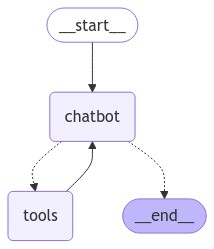
This routing allows LangGraph to dynamically decide whether to execute a tool or close the response.
You can visualize the graph using the method <code>get_graph:
Step 6: Compile and run the graph
Once all nodes are defined and connected, compile the graph and use it in your application.
-> When running the graph, you can also
stream events to get a real-time response from the agent.
Complete Code
Here is the complete code compiled for a full and standalone implementation (be sure to replace the Tavily key in the code) :
Conclusion
Adding tools to a LangGraph agent fundamentally transforms its capabilities. It is no longer just a static chatbot but an adaptive agent capable of exploring the web, reacting to real-time data, and interacting with external systems. LangGraph provides a robust and flexible infrastructure for developing these augmented agents. Once you have grasped this foundation, you can go further by integrating custom tools, adding conversational memory, or managing more complex interaction cycles. It is a true toolkit for building the intelligent agents of tomorrow.