Taught by Tech Leads

Master pipelines, cloud & AI to become an operational Data Engineer.

DataScientist.fr
Image de Create a "Plan and Execute" agent with LangGraph: complete guide
Artificial Intelligence
LLM
Python

Create a "Plan and Execute" agent with LangGraph: complete guide

Photo de Romain DE LA SOUCHÈRE

Tech Lead, CTO AXI Technologies

Published on 16 mai 2025 · 10 min of reading

The creation of intelligent agents capable of planning and executing complex tasks is a major challenge for generative AI. With LangGraph, an overlay of LangChain specialized in building agents represented as execution graphs, it is now possible to set up a 'Plan and Execute' agent in a structured and efficient manner.
This tutorial guides you step by step in creating such an agent, inspired by models like Plan-and-Solve or BabyAGI.

What is a 'Plan and Execute' agent?

Unlike a classic ReAct agent that thinks and acts on a case-by-case basis, a 'Plan and Execute' agent follows a two-phase approach:
  1. Planning: developing a sequence of steps needed to solve a given problem.

  2. Execution: carrying out the steps one by one, adapting the plan if necessary.
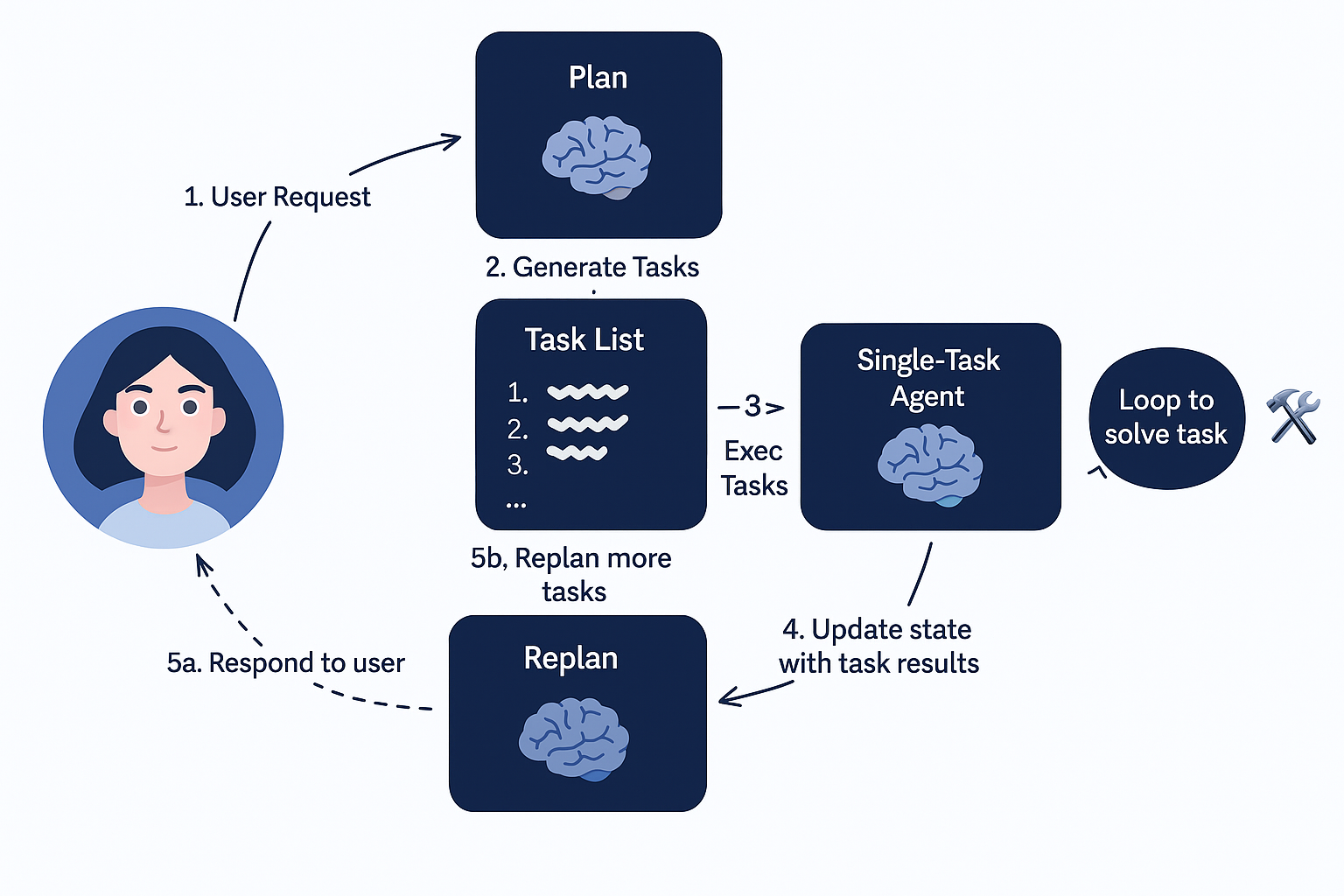
Schéma illustratif d'un agent plan-and-execute

Advantages of the approach

  • Better long-term planning capability.

  • Ability to combine multiple LLM models: a powerful model for planning, a lighter one for execution.

Setting up an agent with LangGraph

-> For those just starting out, here's how to create a basic agent with LangGraph.

1. Install dependencies

python

2. Initialize API keys

python

3. Define the tools

In this example, we use the search tool TavilySearchResults:
python
-> In this example, we use the TavilySearchResults search tool, but it is also possible to create a LangGraph agent capable of using external tools.

4. Execution agent

python

5. State structure

python

Creating graph nodes

6. Initial planning

python

7. Re-planning

python

8. Execution functions

python
-> For better human integration, learn how to leverage Human-in-the-Loop with LangGraph.

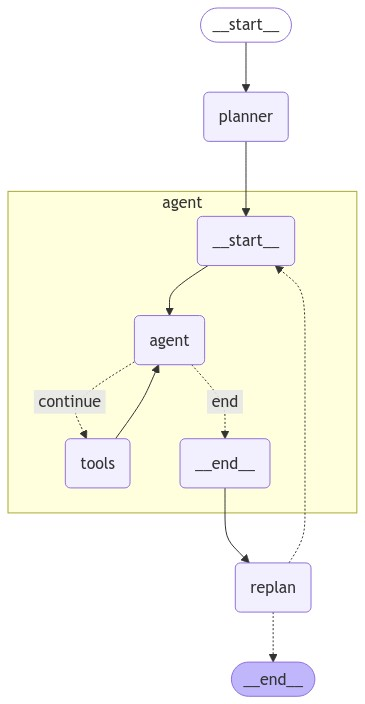
Building the LangGraph

python
Plan and execute Langgraph agent

Example usage

python

Conclusion

The 'Plan and Execute' approach with LangGraph enables the creation of more strategic and flexible agents capable of long-term reasoning. This model paves the way for even more complex agents that can dynamically reorganize their plans based on outcomes.
To go further, consider exploring parallel structures (DAG) to optimize the execution of multiple tasks simultaneously.

Want to go further?

This topic is part of our Generative AI for Developers course. Browse the full programme, or get it by email.

Share with

Photo de Romain DE LA SOUCHÈRE

Romain DE LA SOUCHÈRE

Tech Lead, CTO AXI Technologies

Expert Data Engineering et Cloud, Romain affiche plus de 11 ans d'expérience, dont plusieurs années comme Lead Developer sur des solutions Smart Building haute performance. Il y a conçu et mis en production des moteurs de traitement capables d'absorber des centaines de milliers de données de capteurs par minute, ainsi que des bases clusterisées gérant plus de 10 millions de données dynamiques. Certifié Microsoft Azure DevOps Engineer Expert, il maîtrise aussi bien le développement back-end (Python, C#) que le DevOps (Docker, Kubernetes, Terraform) et les agents LLM. Formateur en Python, cloud, DevOps et IA générative appliquée, il forme avec une obsession : Amener chaque apprenant à concevoir et déployer des architectures réellement scalables en production.

» Learn More

Associated trainings

All our trainings
Image de la formation Generative AI for Developers
Generative AI for Developers
50 hours
Intermediate
Guarantee