In the world of software development, database manipulation is a crucial skill. Whether you are a beginner or an experienced developer, mastering SQL commands (Structured Query Language) is essential for effectively interacting with relational databases. This article is designed as a quick reference guide, covering the ten most important SQL commands that every developer should know.
Why learn SQL?
Learning SQL allows developers to create, read, update, and delete data in a database. By understanding these fundamental commands, you will be able to manage databases effectively, optimize queries for better performance, and ensure data integrity and security.
What to expect
We will explore each command with practical examples and real-world use cases. From SELECT to TRANSACTION, each command will be explained in detail, providing you with the knowledge needed to apply them in your daily projects. Get ready to enhance your SQL skills and become a more effective and versatile developer.
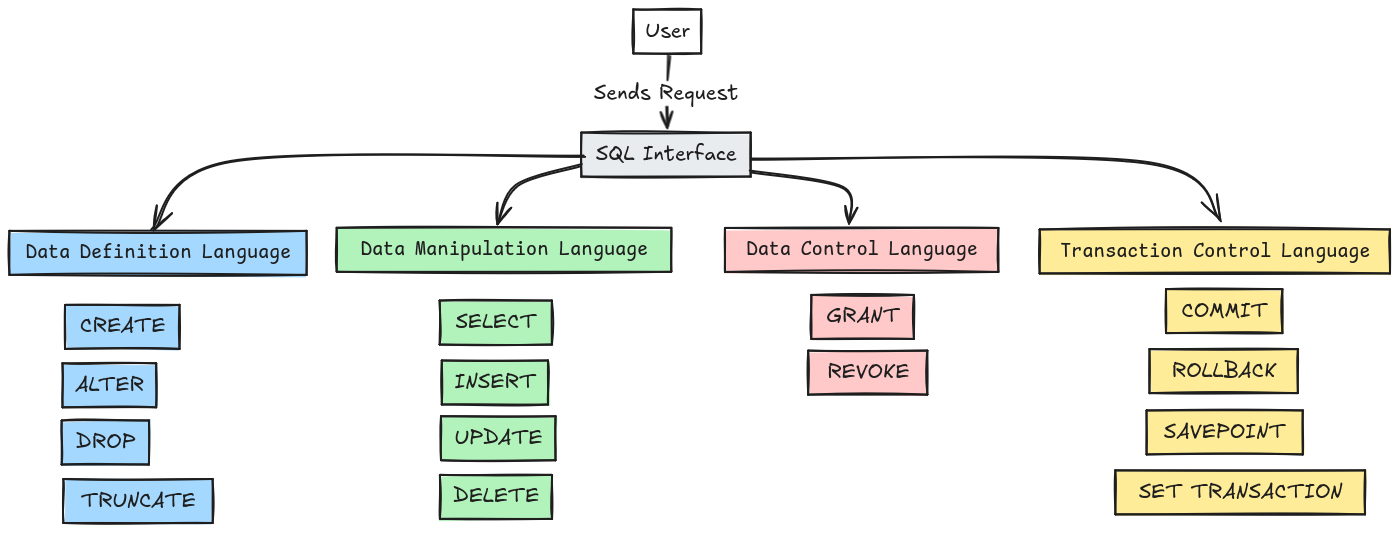
SELECT and its variants
The SELECT command is probably the most used SQL command. It allows you to retrieve specific data from one or more tables in a database. Here are some examples of using the SELECT command and its variants.
Basic SELECT
The basic syntax for a SELECT query is as follows:
For example, to select the names and ages of users in a users table, you can use:
SELECT with conditions
To filter the results, you can add a WHERE clause:
This will select only users older than 18 years.
SELECT with sorting
You can sort results using the ORDER BY clause:
This will sort users by descending age.
SELECT with joins
To retrieve data from multiple tables, you can use joins:
This query selects the names of users and the products ordered.
INSERT and UPDATE for data management
The INSERT and UPDATE commands are essential for managing data in a database. They allow you to add new entries and update existing entries, respectively.
INSERT
The INSERT command allows you to add new rows to a table. Here is a basic syntax example:
For example, to add a new user in the users table, you can use:
UPDATE
The UPDATE command allows you to modify existing entries. Here is a basic syntax example:
To update the age of a specific user, you can use:
Best practices
- Always use a
WHERE clause: to avoid accidental updates or insertions on all rows. - Check the values: ensure that the inserted or updated values meet the table constraints.
DELETE and TRUNCATE for data deletion
Data management also involves deletion, and the DELETE and TRUNCATE commands are used for this purpose. Although they have similar objectives, they work differently and are used in different contexts.
DELETE
The DELETE command allows you to delete specific rows from a table based on a given condition. Here is a syntax example:
For example, to delete a user named Alice from the users table, you can use:
This command only deletes the rows that meet the condition.
TRUNCATE
The TRUNCATE command allows you to delete all rows from a table but retains the table structure for future insertions. Here is a syntax example:
For example, to delete all entries from the users table, you can use:
Key differences
DELETE can be used with a WHERE clause to target specific rows.TRUNCATE is faster but cannot be used to delete specific rows, only all rows from the table.
JOIN and different types of joins
Joins (JOIN) are used to combine rows from two or more tables based on a common condition. Here are some commonly used types of joins and their examples.
INNER JOIN
The INNER JOIN returns only the rows where there is a match in both tables. Here is an example:
This selects the names of users and the order dates where there is a match.
LEFT JOIN
The LEFT JOIN returns all rows from the left table and the matching rows from the right table. If no match is found, the results from the right table will be NULL.
RIGHT JOIN
The RIGHT JOIN works the same way as the LEFT JOIN but returns all rows from the right table and the matching rows from the left table.
FULL JOIN
The FULL JOIN returns all rows where there is a match in either table. Non-matching results from both tables will have NULL values.
Essential aggregate functions
Aggregate functions allow for calculations on a set of values and return a single value. They are particularly useful for reporting and data analysis. Here are some essential aggregate functions.
COUNT
The COUNT function returns the number of rows that meet a specified condition. For example, to count the number of users in the users table:
SUM
The SUM function returns the sum of values in a numeric column. For example, to calculate the total amounts of all orders:
AVG
The AVG function returns the average of values in a column. For example, to calculate the average age of users:
MAX and MIN
The MAX and MIN functions return the maximum and minimum value of a column, respectively. For example, to find the highest and lowest age of users:
WHERE and HAVING clauses
The WHERE and HAVING clauses are used to filter the results of an SQL query to return only the rows that meet certain conditions.
WHERE clause
The WHERE clause is used to filter rows before data aggregation. It generally applies to individual columns and basic conditions. For example, to select users older than 18 years:
You can also use logical operators like AND, OR to combine multiple conditions:
HAVING clause
The HAVING clause is used to filter results after data aggregation. It is often used with aggregate functions like COUNT, SUM, AVG, etc. For example, to select cities with more than 10 users:
The HAVING clause allows you to specify conditions on the groups of results generated by the GROUP BY clause. By combining WHERE and HAVING, you can further refine your SQL queries.
Using subqueries
Subqueries, or nested queries, are SQL queries included within another SQL query. They allow for more complex queries and filtering results based on data from another table.
Subquery in a SELECT clause
A subquery can be used in a SELECT clause to return a calculated value. For example, to select users and their most recent order:
Subquery in a WHERE clause
A subquery can also be used in a WHERE clause to filter results based on another query. For example, to select users who have placed orders:
Subquery in a FROM clause
A subquery can be used in a FROM clause to create a temporary table. For example, to select users and the total of their orders:
Managing transactions with COMMIT and ROLLBACK
Transaction management is crucial for ensuring data integrity in a database. The COMMIT and ROLLBACK commands allow you to control transactions, ensuring that data modification operations are performed atomically.
Starting a transaction
To begin a transaction, use the BEGIN or START TRANSACTION command:
All data modification operations after this command are part of the transaction.
COMMIT
The COMMIT command allows you to validate all operations performed in a transaction, making them permanent in the database:
Use this command at the end of your transaction to ensure that the changes are saved.
ROLLBACK
The ROLLBACK command allows you to undo all operations performed since the beginning of the transaction, restoring the database to its initial state before the transaction:
Use this command in case of an error or if a transaction condition is unmet, thus ensuring data integrity.
Practical example
Here is an example combining these commands:
If an error occurs, use ROLLBACK to undo the changes.
Going further
Do you want to go beyond querying and make SQL a true professional asset? Discover our certified training programs:
- Become a Data Analyst: master SQL, data modeling, and Business Intelligence to transform your queries into analyses that impact decisions (6 months, RNCP level 7 blocks and Microsoft PL-300 certification).
- Master's in Modern Data Engineering: design and industrialize the data pipelines and architectures that power these databases, from cloud to Big Data (9 months, RNCP level 7 degree — Bac+5).






